617 views
この記事は最終更新から 412日 が経過しています。
【1】やりたいこと
こちらのページのように、テーブル上をマウスホバーした時に、ポイントしている行と列の背景色を変えたい。
https://baseball.yahoo.co.jp/mlb/stats/batter?gameKindId=1002&type=avg
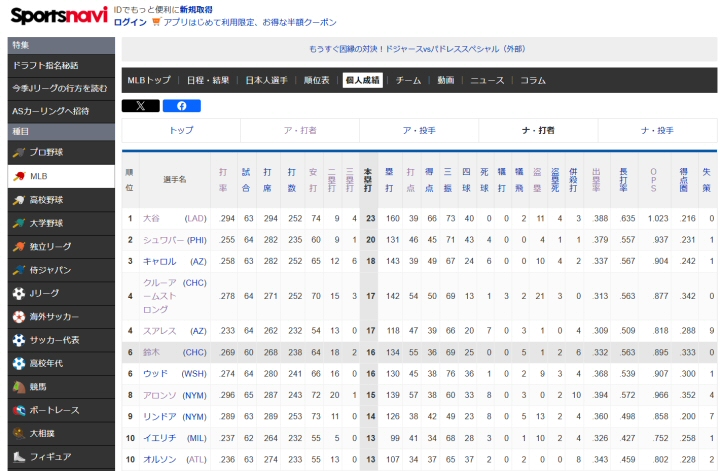
【2】やってみた
1) 実装方針
実装のポイントは?
個々のセルを、個別に style変更や class追加・削除するのは NG
Webブラウザの処理負荷が上がる。
行方向は tr要素を一つだけ、列方向は colgroup要素を一つだけ、
合計 2回の style変更 or class追加・削除で済ませる。
2) プログラムソースコード
<!DOCTYPE html>
<html lang="ja">
  <head>
    <meta charset="UTF-8">
    <title>Sample 163</title>
    <link rel="stylesheet" href="style.css" />
  </head>
  <body>
    <h2>テーブル上をホバーすると行・列がハイライトされる。</h2>
    <table class="myHover">
      <?php echo makeHtml_colgroup(25);
            echo makeHtml_tbody(20,25); ?>
    </table>
    <script src="script.js"></script>
  </body>
</html>

<?php
// 複数行、複数列のテーブル作成が楽なので、PHPで書く。
////////////////////////////////////////////////////////////////////////////////
function makeHtml_colgroup( $nCol ){
  $html = '';
  for( $c = 0 ; $c < $nCol ; $c++ ){
    $html .= '<col>';
  }
  return '<colgroup>'.$html.'</colgroup>';
}
////////////////////////////////////////////////////////////////////////////////
function makeHtml_tbody( $nRow, $nCol ){
  $html = '';
  for( $r = 0 ; $r < $nRow ; $r++ ){
    $html .= '<tr>';
    for( $c = 0 ; $c < $nCol ; $c++ ){
      $html .= '<td> . </td>';
    }
    $html .= '</tr>';
  }
  return '<tbody>'.$html.'</tbody>';
}
?>
一昔前は、こういう UI周りのコードを書こうと思うと JQueryの出番だったが、
Native JavaScriptがずっと便利になったので、最近は JQueryを使わなくなった。
document.addEventListener("DOMContentLoaded", function() {
  const tables = document.querySelectorAll("table.myHover");      // クラス指定で複数テーブルを対象
  if (!tables.length) return;
  const color_on_R = "rgba(255, 230, 200, 0.5)";
  const color_on_C = "rgba(200, 230, 255, 0.5)";
  //---------------------------------------------------------------------------->>> 全テーブルを処理
  tables.forEach(function(table) {
    const colgroup = table.querySelector("colgroup");
    const cols = colgroup ? colgroup.children : [];
    const rows = table.rows;
    ////////////////////////////////////////////////////////////////////////////
    table.addEventListener("mouseover", function(e) {   // Mouse Over Event Handler
      if (e.target.tagName === "TD" || e.target.tagName === "TH") {
        const cell = e.target;
        const rowIndex = cell.parentNode.rowIndex;
        const colIndex = cell.cellIndex;
        rows[rowIndex].style.backgroundColor = color_on_R;
        if (cols[colIndex]) {
          cols[colIndex].style.backgroundColor = color_on_C;
        }
      }
    });
    ////////////////////////////////////////////////////////////////////////////
    table.addEventListener("mouseout", function(e) {    // Mouse Out Event Handler
      if (e.target.tagName === "TD" || e.target.tagName === "TH") {
        const cell = e.target;
        const rowIndex = cell.parentNode.rowIndex;
        const colIndex = cell.cellIndex;
        rows[rowIndex].style.backgroundColor = "";
        if (cols[colIndex]) {
          cols[colIndex].style.backgroundColor = "";
        }
      }
    });
    ////////////////////////////////////////////////////////////////////////////
    table.addEventListener("click", function(e) {       // Click Over Event Handler (Smapho, Tablet用)
      if (e.target.tagName === "TD" || e.target.tagName === "TH") {
        clearAllHighlights();
        const cell = e.target;
        const rowIndex = cell.parentNode.rowIndex;
        const colIndex = cell.cellIndex;
        rows[rowIndex].style.backgroundColor = color_on_R;
        if (cols[colIndex]) {
          cols[colIndex].style.backgroundColor = color_on_C;
        }
      }
    });
    ////////////////////////////////////////////////////////////////////////////
    function clearAllHighlights() {                     // ハイライト表示全解除
      for (let r of rows) {
        r.style.backgroundColor = "";
      }
      for (let c of cols) {
        c.style.backgroundColor = "";
      }
    }
  });
  //----------------------------------------------------------------------------<<< 全テーブルを処理
});
/*
このcssはテーブルを見やすくするためだけのものです。
行・列のハイライト機能には一切関係しません。
*/
table{
    border-collapse: collapse;
}
td{
    border: 1px #bbb solid;
    font-size: 1.5rem;
    padding:   0.5rem 1rem;
}
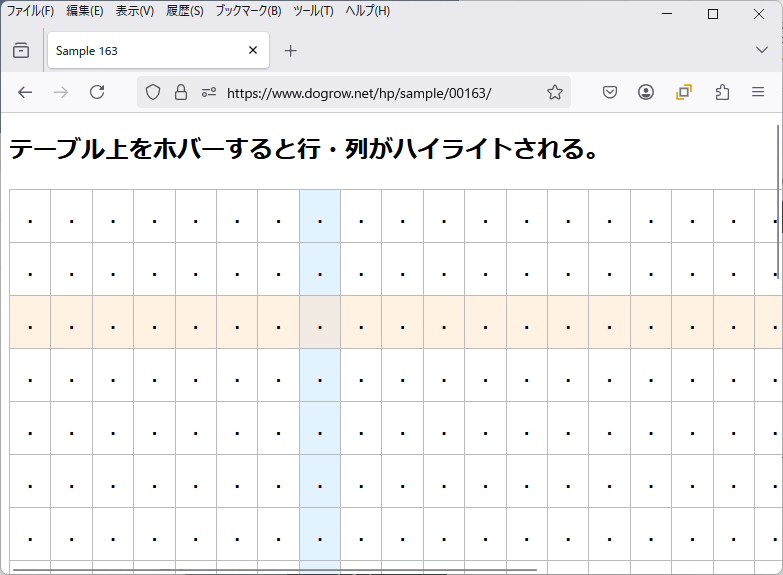
3) 実装サンプル
上記のプログラム一式をこちらに設置しました。
https://www.dogrow.net/hp/sample/00163
【3】所感
特になし。
簡単に適用できるので、今後は適用個所を思いついたら気軽に組み込んでみようかな。
アクセス数(直近7日): ※試験運用中、BOT除外簡易実装済2026-07-26: 0回 2026-07-25: 0回 2026-07-24: 0回 2026-07-23: 0回 2026-07-22: 0回 2026-07-21: 0回 2026-07-20: 1回