265 views
【0】連載内容
(134)【Google Cloud TTS #1】子どもの英会話学習教材を作りたい!
(135)【Google Cloud TTS #2】Google Cloud側の準備作業
(136)【Google Cloud TTS #3】自前サーバー側の準備作業(Ubuntu24)
(137)【Google Cloud TTS #4】WEBブラウザから実行
(138)【Google Cloud TTS #5】話す速度をゆっくりに ←今回はココ
(139)【Google Cloud TTS #6】声の大きさ、声の高さを変える。
(140)【Google Cloud TTS #7】Webブラウザ上で話者(Voice)を指定可能に
(141)【Google Cloud TTS #8】二人以上の会話を入力可能に
(142)【Google Cloud TTS #9】英会話教材を作る。(一先ず完結)

【1】やりたいこと
前回の投稿の時点で、Webブラウザ上の操作で英文テキストを MP3ファイル化するところまで実現できた。
今回の投稿では…
話す速度を速くしたり遅くしたりと変化させたい。
【2】やってみる
こちらの AudioConfigクラスのリファレンスページを参照されたい。
Class AudioConfig (2.34.0)
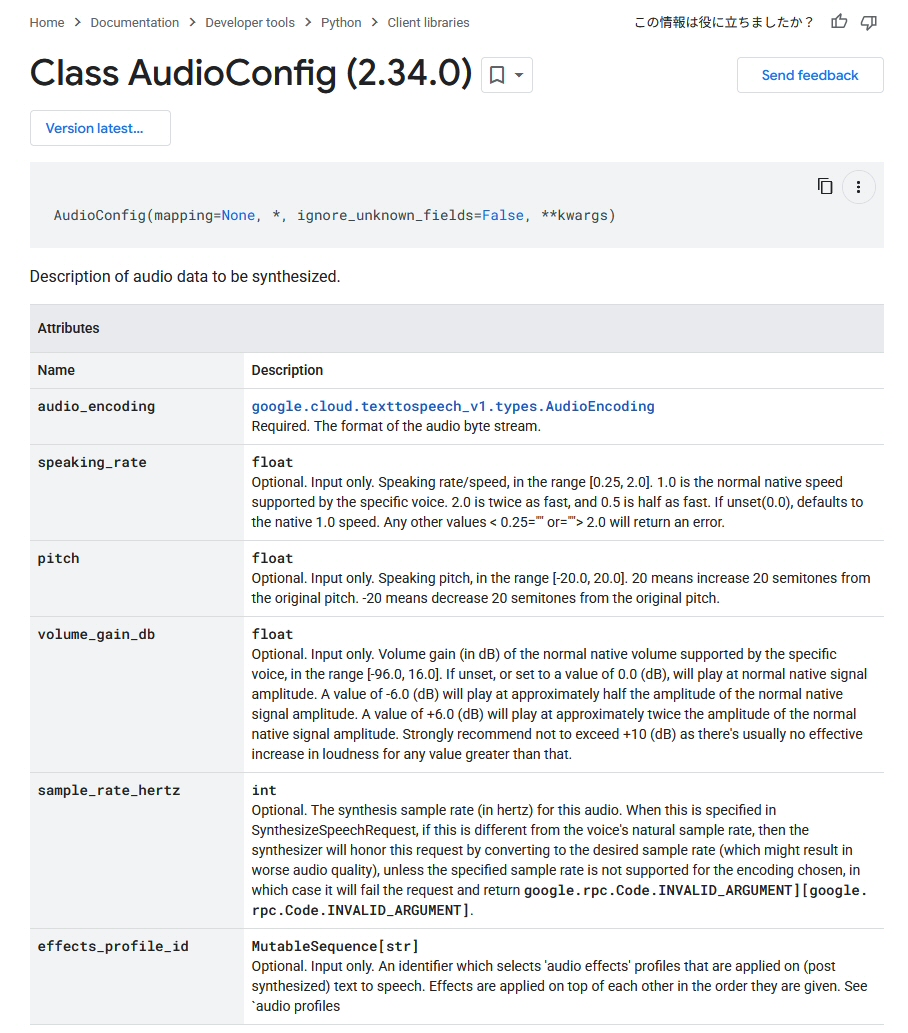
AudioConfigクラスの生成時に、引数 speaking_rate で話す速度を指定できる仕様だ。
| データ型 | float |
| 初期値 | 1.0 [倍] |
| 指定可能な範囲 | 0.25 ~ 2.0 [倍] |
プログラム中では以下のように指定すればよい。
    audio_config = texttospeech.AudioConfig(
        audio_encoding = texttospeech.AudioEncoding.MP3,
        speaking_rate = 0.7      # 速さを 30%ゆっくりにする。
    )
【3】プログラム一式を改造する。
前回の投稿 (137)【Google Cloud TTS #4】WEBブラウザから実行 で作成したプログラムを以下のように改造する。
【変更点 #1】index.py : Webブラウザ上の操作画面で、話す速度を指定可能にする。
【変更点 #2】my_ggtts.py : Webブラウザ上で指定された速度を使い Cloud TTSにリクエストを送信する。
改造後のプログラムを以下に記す。
index.py
#!/opt/webtts/myenv/bin/python
import cgi
import os
import sys
from datetime import datetime

# 自作モジュールのパスを通す
sys.path.append('/opt/webtts/src')
import my_ggtts

# デバッグ用(エラー時に詳細をブラウザに表示)
import cgitb
cgitb.enable()

# フォームデータの取得
form = cgi.FieldStorage()
input_text = form.getvalue("text", "")
# speaking_rateを取得(未指定ならデフォルト1.0。float型に変換)
try:
    speaking_rate = float(form.getvalue("speaking_rate", "1.0"))
except ValueError:
    speaking_rate = 1.0

html_sound = ""      # サウンド再生コントロールを表示する HTML文

#-----------------------------------------------------------------------
# フォームにテキストが入力されていれば TTSを実行する。
if input_text:
    # MP3ファイル名を作る。
    timestamp = datetime.now().strftime("%Y-%m-%d-%H-%M-%S")
    filename = f"sound-{timestamp}.mp3"
    try:
        my_ggtts.generate_voice(input_text, filename, speaking_rate=speaking_rate)
        # ブラウザからアクセス可能な MP3ファイルの URLパス
        audio_url  = f"/webtts/sound/{filename}"
        html_sound = f"""
            <hr>
            <h3>生成結果:</h3>
            <audio controls autoplay>
                <source src="{audio_url}?t={os.path.getmtime('/opt/webtts/www/sound/'+filename)}" type="audio/mpeg">
                お使いのブラウザはaudio要素をサポートしていません。
            </audio>
        """
    except Exception as e:
        print(f"<p style='color:red;'>エラー発生: {e}</p>")

#-----------------------------------------------------------------------
# HTTPヘッダーの出力
print("Content-Type: text/html; charset=utf-8\n")

#-----------------------------------------------------------------------
# HTMLの出力
print(f"""
<!DOCTYPE html>
<html lang="ja">
<head>
    <meta charset="UTF-8">
    <title>Google Cloud TTS Demo</title>
</head>
<body>
    <h1>Text to Speech</h1>
    <form method="POST">
        <textarea name="text" rows="4" cols="50" placeholder="喋らせたい文字を入力...">{input_text}</textarea><br>
        <div class="setting">
            <label for="rate">読み上げ速度:</label>
            <input type="number" id="rate" name="speaking_rate" value="{speaking_rate:.1f}" step="0.1" min="0.3" max="2.0">
            <small>(0.3 ~ 2.0)</small>
        </div>
        <button type="submit">音声を生成</button>
    </form>
    {html_sound}
</body></html>
""")
my_ggtts.py
import os
from google.cloud import texttospeech

# Text-to-Speech API 鍵ファイルの絶対パス
KEY_PATH = "/opt/webtts/auth/key.json"
os.environ["GOOGLE_APPLICATION_CREDENTIALS"] = KEY_PATH

#-----------------------------------------------------------------------
# 引数:   text(合成する文字), filename(保存ファイル名)
# 戻り値: 保存されたファイルの絶対パス
def generate_voice( text, filename, speaking_rate=1.0 ):
    client          = texttospeech.TextToSpeechClient()
    synthesis_input = texttospeech.SynthesisInput(text=text)

    # 音声設定
    voice        = texttospeech.VoiceSelectionParams(language_code="en-US", name="en-US-Chirp3-HD-Rasalgethi")
    audio_config = texttospeech.AudioConfig(audio_encoding=texttospeech.AudioEncoding.MP3, speaking_rate=speaking_rate )

    # TTS実行
    response = client.synthesize_speech(input=synthesis_input, voice=voice, audio_config=audio_config )

    # MP3ファイル出力
    output_path = os.path.join("/opt/webtts/www/sound", filename)
    with open(output_path, "wb") as out:
        out.write(response.audio_content)

    return output_path
できた!
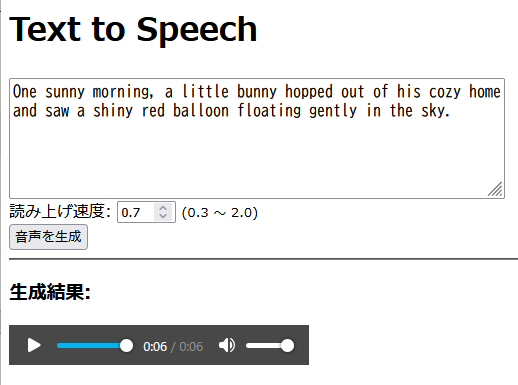
デザインは全くの未装飾なので操作性はイマイチだが、現時点では機能実装を優先しているので無問題とする。
後日きっちりと操作性を向上させよう。
【4】速度を変えて作成した MP3ファイル
出来上がった MP3音声ファイルは以下の通り。
英会話初心者の子どもの学習用には 0.7倍速ぐらいが良いようだ。
| 1.0倍速 | |
| 0.7倍速 | |
| 1.3倍速 |
【5】次にやりたいこと
・二人以上の会話を入力可能にする。
→ (音声キャラクター、英文テキスト)をセットとし、複数セットを順番に TTS処理し、一つのMP3ファイルに結合する。
・音量を上げる。