340 views
【0】連載内容
(134)【Google Cloud TTS #1】子どもの英会話学習教材を作りたい!
(135)【Google Cloud TTS #2】Google Cloud側の準備作業
(136)【Google Cloud TTS #3】自前サーバー側の準備作業(Ubuntu24)
(137)【Google Cloud TTS #4】WEBブラウザから実行
(138)【Google Cloud TTS #5】話す速度をゆっくりに
(139)【Google Cloud TTS #6】声の大きさ、声の高さを変える。
(140)【Google Cloud TTS #7】Webブラウザ上で話者(Voice)を指定可能に
(141)【Google Cloud TTS #8】二人以上の会話を入力可能に ←今回はココ
(142)【Google Cloud TTS #9】英会話教材を作る。(一先ず完結)

【1】やりたいこと
今回は、前回の投稿 の「今後やりたいこと」に書いたことを実装する。
二人以上の会話を入力可能にする。
→ (音声キャラクター、英文テキスト)をセットとし、複数セットを順番に TTS処理し、一つのMP3ファイルに結合する。
【2】完成形
こんな感じに出来上がった。
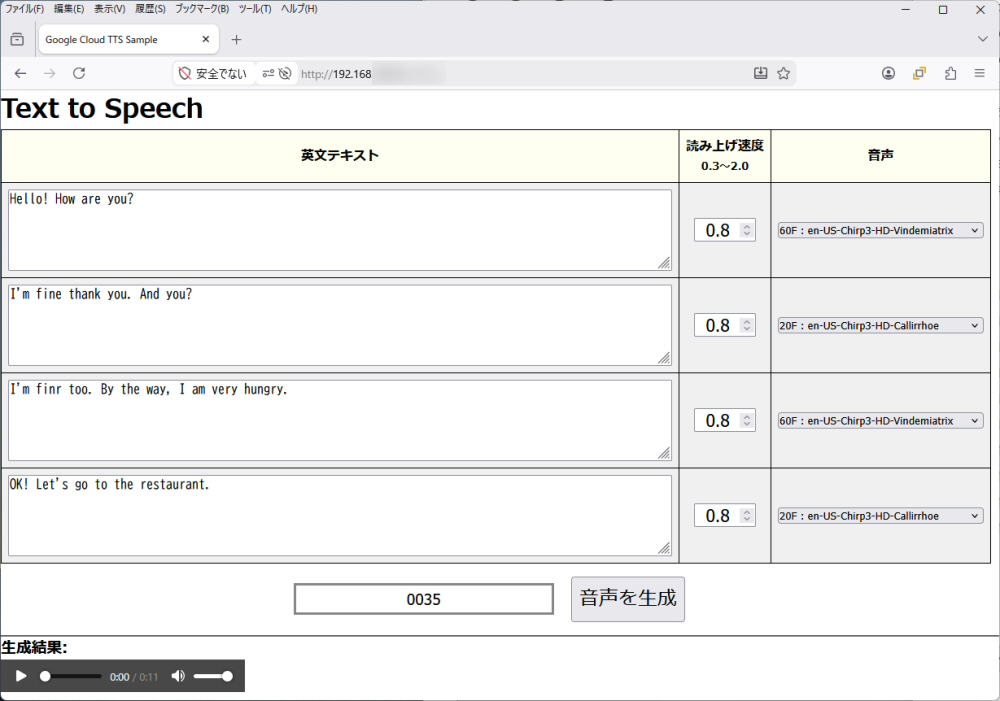
使い方
(1) 英文テキストを入力する。
(2) 読み上げ速度を設定する。 0.3倍 ~ 2.0倍
(3) 音声を選択する。
これを最大4回分指定できる。これを使えば複数人が会話しているシーンが作れる。
↓
[音声を生成] ボタンを押下すると、上記(1),(2),(3)で指定した通りの MP3音声ファイルが出来上がる。
【3】プログラム
エラー処理、ログ収集処理などの残件がいろいろとあるが、ひとまず所望の機能を実装できたので記録しておこう。
1/6 : index.py
Webページを使った操作画面だ。
#!/opt/webtts/myenv/bin/python
import cgi
import os
import sys
from datetime import datetime

# デバッグ用(エラー時に詳細をブラウザに表示)
import cgitb
cgitb.enable()

# 自作モジュールのパスを通す
sys.path.append('/opt/webtts/src')
import my_ggtts
from CVoice import CVoices

# HTTPヘッダーの出力
print("Content-Type: text/html; charset=utf-8\n")

#///////////////////////////////////////////////////////////////////////
def execute_TTS(form, cvoices):
    #-------------------------------------------------------------------
    # 入力情報を取得
    texts  = form.getlist('text[]')
    srates = form.getlist('srate[]')
    vnames = form.getlist('vname[]')
    fname_prefix = form.getvalue('fname_prefix')
    #-------------------------------------------------------------------
    html_sound = ''
    tts_request = []
    for text, srate, vname in zip(texts, srates, vnames):
        #---------------------------------------------------------------
        if not text:                                # 英文テキストの入力なし?
            break
        #---------------------------------------------------------------
        try:
            sratef = float(srate)
        except (TypeError, ValueError):
            sratef = 0.8
        sratef = max(0.3, min(2.0, sratef))         # 0.3~2.0に丸める。
        #---------------------------------------------------------------
        vitem = cvoices.get_item(vname)             # 指定の Voice情報を取得
        if not vitem:
            raise RuntimeError(f"Internal error in execute_TTS[1]")
        #---------------------------------------------------------------
        tts_request.append([text, sratef, vitem])
    #-------------------------------------------------------------------
    if len(tts_request) > 0:
        #---------------------------------------------------------------
        # MP3ファイル名を作る。
        filename  = f"{fname_prefix}.mp3"
        #---------------------------------------------------------------
        # TTS実行
        try:
            output_filepath = os.path.join(my_ggtts.OUTPUT_DIR, filename)
            my_ggtts.generate_voice_from_list( tts_request, output_filepath )
            audio_url  = f"/webtts/sound/{filename}"
            html_sound = f"""
                <hr>
                <h3>生成結果:</h3>
                <audio controls autoplay>
                    <source src="{audio_url}?t={os.path.getmtime(output_filepath)}" type="audio/mpeg">
                    お使いのブラウザはaudio要素をサポートしていません。
                </audio>
            """

        except Exception as e:
            raise RuntimeError(f"TTS failed: {e}") from e
    #-------------------------------------------------------------------
    return html_sound

#///////////////////////////////////////////////////////////////////////
def makeHtml_conversationForm( cvoices, form, num_rows=4 ):
    #-------------------------------------------------------------------
    texts  = form.getlist('text[]')
    srates = form.getlist('srate[]')
    vnames = form.getlist('vname[]')
    #-------------------------------------------------------------------
    html_rows = ''
    rows = []
    for i in range(num_rows):
        #---------------------------------------------------------------
        # formデータがあれば、前回の入力値を取得する。
        text  = texts[i]  if len(texts)  > i else ''
        srate = srates[i] if len(srates) > i else '0.8'
        vname = vnames[i] if len(vnames) > i else ''
        #---------------------------------------------------------------
        # Voice選択の <select> 要素を作成
        html_select_voice = cvoices.getHtml_select(active_vname=vname, elm_name='vname[]')
        #---------------------------------------------------------------
        # 1 Voice分(=1行分)の表示項目を作成
        html_row = f'''
            <td><textarea name="text[]" rows="5" cols="100" placeholder="喋らせたい文字を入力...">{text}</textarea><br></td>
            <td><input type="number" name="srate[]" value="{srate}" step="0.1" min="0.3" max="2.0"></td>
            <td>{html_select_voice}</td> '''
        rows.append(f'<tr>{html_row}</tr>')
    #-------------------------------------------------------------------
    html_rows = ''.join(rows)
    return f'''
        <table>
            <tr>
                <th>英文テキスト</th>
                <th>読み上げ速度<br><small>0.3倍~2.0倍</small></th>
                <th>音声</th>
            </tr>
            {html_rows}
        </table> '''

#///////////////////////////////////////////////////////////////////////
form = cgi.FieldStorage()   # フォームデータの取得
action = form.getvalue('action', '')
cvoices = CVoices()         # 音声(voice)情報を JSONファイルからロードする。
html_sound = ''             # サウンドプレイヤーのHTML文
if action == 'exectts':     # [音声を生成]ボタン押下であれば TTSを実行する。
    try:
        html_sound = execute_TTS(form, cvoices)
    except Exception as e:
        print(f"<p style='color:red;'>エラー発生: {e}</p>")  # ★後でloggingに変更する。

#///////////////////////////////////////////////////////////////////////
html_speech_form = makeHtml_conversationForm(cvoices, form)  # 入力フォームの HTML文を作成
fname_prefix = form.getvalue('fname_prefix')
# HTMLの出力
print(f"""
<!DOCTYPE html>
<html lang="ja">
<head>
    <meta charset="UTF-8">
    <link rel="stylesheet" href="style.css" />
    <title>Google Cloud TTS Sample</title>
</head>
<body>
    <h1>Text to Speech</h1>
    <form method="POST">
        <div class="setting">
            {html_speech_form}
            <input id="fname_prefix" type="text" name="fname_prefix" value="{fname_prefix}" placeholder="ファイル名のprefix">
            <button type="submit" name="action" value="exectts">音声を生成</button>
        </div>
    </form>
    {html_sound}
</body></html>
""")
2/6 : style.scss
最低限の装飾を施した。SASSで書いた方が編集しやすい。
@charset "UTF-8";

*{
    margin:0;
    padding:0;
    box-sizing: border-box;
}

button, select{
    cursor: pointer;
}

table{
    border-collapse: collapse;
    border-spacing: 0;
    tr, th, td{
        border: 1px #000 solid;
    }
    th, td{
        padding: 0.5rem;
    }
    th{
        background-color: #fffff0;
    }
    td{
        background-color: #f0f0f0;
    }
}

div.setting{
    display: inline-block;
    text-align: center;
}

input[type="number"]{
    text-align: center;
    font-size: 1.3rem;
}

button[type="submit"]{
    margin: 1rem;
    padding: 0.5rem;
    font-size: 1.5rem;
}

input#fname_prefix{
    text-align: center;
    font-size: 1.2rem;
    width: 20rem;
    padding: 0.3rem;
    border: 3px #888 solid;
}
3/6 : my_ggtts.py
Google Cloud TTS(Text-to-Speech)とのインターフェイス、今回のコアモジュールだ。
import os
import tempfile
from google.cloud import texttospeech
from CMP3Joiner import CMP3Joiner

OUTPUT_DIR = "/opt/webtts/www/sound"

# Text-to-Speech API 鍵ファイルの絶対パス
KEY_PATH = "/opt/webtts/auth/key.json"
os.environ.setdefault("GOOGLE_APPLICATION_CREDENTIALS", KEY_PATH)

#///////////////////////////////////////////////////////////////////////
def _execute_ggtts(client, etext, language_code, voice_name, speaking_rate, output_path):
    #-------------------------------------------------------------------
    synthesis_input = texttospeech.SynthesisInput(text=etext)
    if not language_code or not voice_name:
        language_code = 'en-US'
        voice_name    = 'en-US-Chirp3-HD-Rasalgethi'
    #-------------------------------------------------------------------
    # 音声設定
    voice        = texttospeech.VoiceSelectionParams(language_code=language_code, name=voice_name)
    audio_config = texttospeech.AudioConfig(audio_encoding=texttospeech.AudioEncoding.MP3, speaking_rate=speaking_rate )
    #-------------------------------------------------------------------
    # TTS実行
    try:
        response = client.synthesize_speech(input=synthesis_input, voice=voice, audio_config=audio_config )
    except Exception as e:
        raise RuntimeError(f"synthesize_speech failed: {e}") from e
    #-------------------------------------------------------------------
    # MP3ファイル出力
    try:
        output_dir = os.path.dirname(output_path)
        if output_dir:
            os.makedirs(output_dir, exist_ok=True)
        with open(output_path, "wb") as out:
            out.write(response.audio_content)
    except Exception as e:
        raise RuntimeError(f"Failed to write MP3 file '{output_path}': {e}") from e
    #-------------------------------------------------------------------

#///////////////////////////////////////////////////////////////////////
def generate_voice(etext, output_path, speaking_rate=1.0, language_code='', voice_name=''):
    #-------------------------------------------------------------------
    # TTS client instance生成
    try:
        client = texttospeech.TextToSpeechClient()
    except Exception as e:
        raise RuntimeError(f"Failed to create TextToSpeechClient: {e}") from e
    #-------------------------------------------------------------------
    # TTS実行
    try:
        _execute_ggtts(client, etext, language_code, voice_name, speaking_rate, output_path)
    except Exception as e:
        raise RuntimeError(f"TTS failed (voice={voice_name}, lang={language_code}): {e}") from e

#///////////////////////////////////////////////////////////////////////
def generate_voice_from_list(tts_requests, filepath):
    #-------------------------------------------------------------------
    # TTS client instance生成
    try:
        client = texttospeech.TextToSpeechClient()
    except Exception as e:
        raise RuntimeError(f"Failed to create TextToSpeechClient: {e}") from e
    #-------------------------------------------------------------------
    # 全ての変換リクエストを順に処理する。
    output_files = []
    for idx, (etext, srate, vitem) in enumerate(tts_requests, start=1):
        lcode = vitem.lcode
        vname = vitem.vname
        if not lcode or not vname:
            raise RuntimeError(f"Invalid voice data at request #{idx}")
        #---------------------------------------------------------------
        try:
            # 連結前の一時ファイル名を作る。
            with tempfile.NamedTemporaryFile(delete=False, suffix=".mp3", dir=OUTPUT_DIR) as tmp:
                output_path = tmp.name
        except Exception as e:
            raise RuntimeError(f"Failed to create temp file at request #{idx}: {e}") from e
        #---------------------------------------------------------------
        # TTS実行
        try:
            _execute_ggtts( client, etext, lcode, vname, srate, output_path )
        except Exception as e:
            raise RuntimeError(f"TTS failed at request #{idx} (voice={vname}, lang={lcode}): {e}") from e
        output_files.append(output_path)
    #-------------------------------------------------------------------
    # 一つのファイルにまとめる。
    if not output_files:
        raise RuntimeError("No audio files were generated.")
    try:
        output_dir = os.path.dirname(filepath)
        if output_dir:
            os.makedirs(output_dir, exist_ok=True)
        CMP3Joiner.join_mp3_files(output_files, filepath)
    except Exception as e:
        raise RuntimeError(f"Failed to join MP3 files: {e}") from e
    #-------------------------------------------------------------------
4/6 : CVoice.py
Google Cloudが提供してくれている音声(Voice, Speaker)をまとめて管理するためのクラスだ。
データは外部の JSONファイル(後述の voice.json)に保存している。
import json
import os
import html
from dataclasses import dataclass

#///////////////////////////////////////////////////////////////////////
@dataclass(frozen=True)
class CVoice:
    lcode: str
    vname: str

#///////////////////////////////////////////////////////////////////////
class CVoices:
    #///////////////////////////////////////////////////////////////////
    def __init__(self, fpath=None):
        #---------------------------------------------------------------
        self.voices: dict[str, dict[str, str | None]] = {}
        #---------------------------------------------------------------
        try:
            #-----------------------------------------------------------
            if not fpath:
                base_dir = os.path.dirname(os.path.abspath(__file__))
                fpath    = os.path.join(base_dir, 'voice.json')
            #-----------------------------------------------------------
            with open(fpath, 'r', encoding='utf-8') as f:
                loaddata = json.load(f)
            if not isinstance(loaddata, list):
                raise RuntimeError(f"Invalid JSON format in {fpath}: root must be a list.")
            #-----------------------------------------------------------
            for voice in loaddata:
                if 'vname' not in voice or 'lcode' not in voice:
                    continue                    # 壊れたデータを無視 ★後でloggingに変更 → データ修正
                self.voices[voice['vname']] = {
                    'age':   voice.get('age'),
                    'sex':   voice.get('sex'),
                    'lcode': voice.get('lcode')
                }
        #---------------------------------------------------------------
        except (OSError, json.JSONDecodeError) as e:
            raise RuntimeError(f"Could not load {fpath}: {e}")

    # public ///////////////////////////////////////////////////////////
    def get_item(self, vname: str) -> CVoice | None:
        #---------------------------------------------------------------
        item = self.voices.get(vname)
        #---------------------------------------------------------------
        if not item or not item.get('lcode'):
            return None
        return CVoice(lcode=item['lcode'], vname=vname)

    # public ///////////////////////////////////////////////////////////
    def getHtml_select(self, conditions: dict[str, str] | None = None, active_vname: str='', elm_name: str='vname') -> str:
        #---------------------------------------------------------------
        if conditions is None:
            conditions = {}
        filtered = self._get_filtered(conditions)
        #---------------------------------------------------------------
        options = []
        for i, (vname, info) in enumerate(filtered.items(), start=1):
            age = '' if info.get('age') is None else str(info.get('age'))
            sex = '' if info.get('sex') is None else str(info.get('sex'))
            #-----------------------------------------------------------
            escaped_name_attr = html.escape(str(vname), quote=True)
            escaped_name_text = html.escape(str(vname), quote=False)
            escaped_age       = html.escape(age,        quote=False)
            escaped_sex       = html.escape(sex,        quote=False)
            #-----------------------------------------------------------
            selected = ' selected' if vname == active_vname else ''
            label = f'{escaped_age}{escaped_sex} : {escaped_name_text}'
            options.append(f'<option value="{escaped_name_attr}"{selected}>({i}) {label}</option>')
        #---------------------------------------------------------------
        if not options:
            options.append('<option value="">No voices available</option>')
        #---------------------------------------------------------------
        html_options = ''.join(options)
        escaped_elm_name = html.escape(str(elm_name), quote=True)
        return f'<select name="{escaped_elm_name}">{html_options}</select>'

    # private //////////////////////////////////////////////////////////
    def _get_by_age(self, age):
        result = {}
        for name, info in self.voices.items():
            if info.get('age') == age:
                result[name] = info
        return result

    # private //////////////////////////////////////////////////////////
    # 指定条件にマッチする Voiceを取得する。
    def _get_filtered(self, conditions: dict[str, str] | None = None):
        if conditions is None:
            conditions = {}
        return {
            name: info
            for name, info in self.voices.items()
            if all(info.get(k) == v for k, v in conditions.items())
        }
5/6 : voice.json
Google Cloudが提供してくれている音声(Voice, Speaker)の中で、使いたいものだけを書いた。
[
  {
    "age":   "10",
    "sex":   "F",
    "lcode": "en-US",
    "vname": "en-US-Chirp3-HD-Achernar"
  },
  {
    "age":   "10",
    "sex":   "F",
    "lcode": "en-US",
    "vname": "en-US-Chirp3-HD-Zephyr"
  },
  :
  : 省略
  :
  {
    "age":   "60",
    "sex":   "M",
    "lcode": "en-US",
    "vname": "en-US-Chirp3-HD-Sadachbia"
  },
  {
    "age":   "60",
    "sex":   "M",
    "lcode": "en-US",
    "vname": "en-US-Chirp3-HD-Zubenelgenubi"
  }
]
6/6 : CMP3Joiner.py
複数の MP3ファイルを結合して一つのファイルにするためのモジュールだ。
複数の会話文を一つの MP3ファイルにしたいので作った。
結合処理は自作せず ffmpeg を利用している。
import os
import tempfile
import subprocess

#///////////////////////////////////////////////////////////////////////
class CMP3Joiner:
    #///////////////////////////////////////////////////////////////////
    @staticmethod
    def _escape_ffmpeg_path(path):
        #---------------------------------------------------------------
        # ffmpeg concat 用にシングルクォートをエスケープ
        return path.replace("'", r"'\''")

    #///////////////////////////////////////////////////////////////////
    @classmethod
    def join_mp3_files(cls, input_files, output_file, cleanup: bool=True):
        #---------------------------------------------------------------
        if not input_files:
            raise ValueError("input_files is empty.")
        #---------------------------------------------------------------
        for path in input_files:                # 入力ファイルの存在確認
            if not os.path.isfile(path):
                raise FileNotFoundError(f"Input file not found: {path}")
        #---------------------------------------------------------------
        tmp_list_file = None
        success = False
        try:
            #-----------------------------------------------------------
            # 一時ファイルを作成
            with tempfile.NamedTemporaryFile(
                mode="w",
                suffix=".txt",
                delete=False,
                encoding="utf-8"
            ) as f:
                tmp_list_file = f.name

                for mp3_file in input_files:
                    abs_path = os.path.abspath(mp3_file)
                    esc_path = cls._escape_ffmpeg_path(abs_path)
                    f.write(f"file '{esc_path}'\n")
            #-----------------------------------------------------------
            # ffmpegコマンド実行し、複数の MP3ファイルを結合する。
            cmd = [
                "ffmpeg", "-y", "-f", "concat", "-safe", "0", "-i", tmp_list_file,
                "-c", "copy", output_file
            ]
            output_dir = os.path.dirname(output_file)
            if output_dir:
                os.makedirs(output_dir, exist_ok=True)
            result = subprocess.run(
                cmd, stdout=subprocess.PIPE,
                     stderr=subprocess.PIPE, text=True
            )
            #-----------------------------------------------------------
            if result.returncode != 0:
                raise RuntimeError(
                    f"ffmpeg failed while creating '{output_file}'.\n"
                    f"stdout:\n{result.stdout}\n"
                    f"stderr:\n{result.stderr}"
                )
            success = True
        #---------------------------------------------------------------
        finally:
            #-----------------------------------------------------------
            # 一時ファイル削除
            if tmp_list_file and os.path.exists(tmp_list_file):
                os.remove(tmp_list_file)
            #-----------------------------------------------------------
            # 入力 MP3ファイルを全削除
            if cleanup and success:
                for f in input_files:
                    try:
                        if os.path.exists(f):
                            os.remove(f)
                    except Exception as e:
                        print(f"Failed to delete {f}: {e}")     # ★後でloggingに変更する。
【4】所感
一先ず、初回 にやりたいと考えていたことが出来るようになった。
この Webアプリを使い、
英語学習をがんばっている我が子のための英会話教材を作ってあげたい。
気を付ける必要があるのは AIで音声を作っているため、
同じ Voiceを使っていても、
作成の度に抑揚や区切りの間などの「話しっぷり」が変化する。
「この Voiceはダメだな」と捨てずに、
同じ Voice & 同じ英文テキストで何度かトライしてみる必要がある
と感じた。
【5】次にやりたいこと
・音声合成マークアップ言語(SSML) を使ってみたい。
このメタ言語を使うと、”.”(ピリオド)の後の空白時間を指定するなど、音声生成を制御できるのだそうな。